
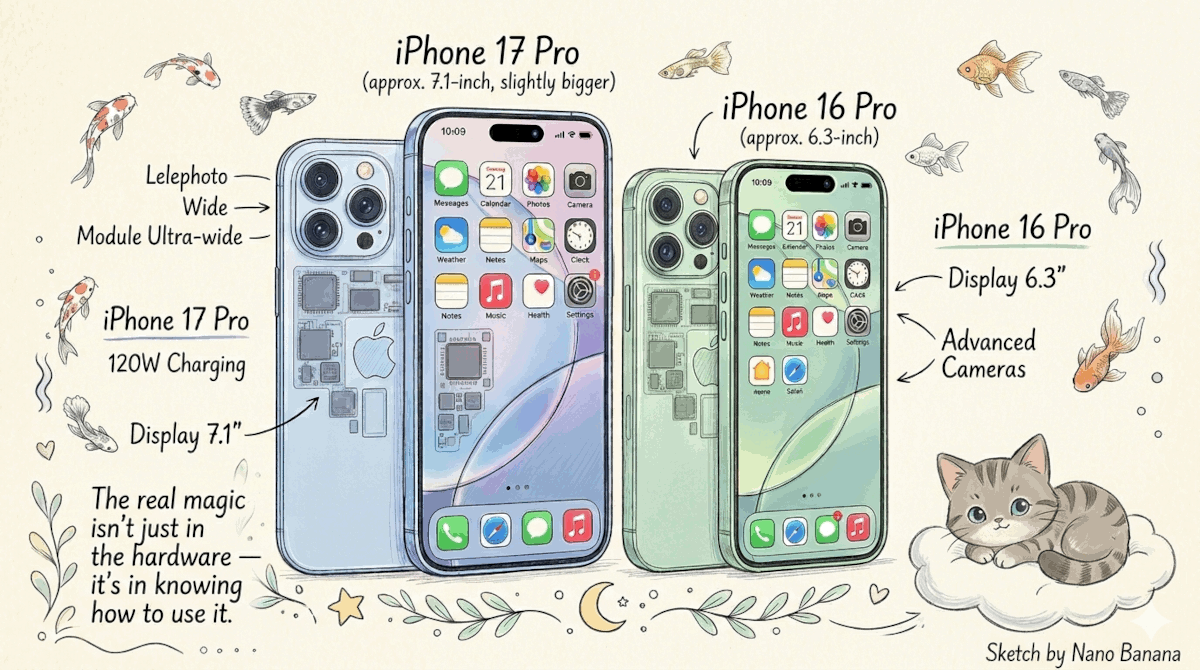
If you’re using an iPhone 16 Pro or iPhone 17 Pro, you’re already carrying one of the most powerful cameras ever built into a smartphone.
Yet most people only use about 30% of what the iPhone Camera app can actually do.
For young professionals, creators, and anyone who wants quick pro shots without carrying a DSLR, learning a few hidden camera settings can completely transform the way you capture moments.
The best part? These are simple tweaks inside the Camera settings that can improve your photography workflow, boost your creative output, and even safe your time when capturing important moments.
Whether you’re shooting content for social media, documenting your travels, or capturing spontaneous life moments, these 12 powerful settings will help you unlock the magic inside your iPhone camera so you can never miss a crucial shot again.
Let’s dive in.
12 iPhone Camera Settings You Probably Didn’t Know About
1. Preserve Your Camera Preferences
Settings → Camera → Preserve Settings
Turning on preserve settings allows your iPhone to remember your last camera mode, exposure adjustment, creative controls, and more.
Instead of resetting every time you open the camera, it will remember exactly how you shot your previous photo.
Benefit: Perfect for creators who constantly switch between video, portrait, or macro shots. It improves workflow and helps you never miss a crucial shot again.
2. Enable Apple ProRAW for Maximum Editing Power
Settings → Camera → Formats → Apple ProRAW
Apple ProRAW captures much more image data than standard photos.
Benefit: You gain incredible flexibility when editing lighting, shadows, and colors. This is one of the easiest ways to turn your iPhone into a pro shots machine.
3. Turn On ProRes for Cinematic Video
Settings → Camera → Formats → Apple ProRes
This enables professional video recording quality.
Benefit: Ideal for content creators who shoot YouTube videos, social media content, or short films using their iPhone 16 pro or iPhone 17 pro.
4. Activate Grid for Perfect Composition
Settings → Camera → Grid
The grid overlays the rule-of-thirds guide.
Benefit: Helps you compose amazing shots with balanced framing — a fundamental trick used by professional photographers.
5. Use Level for Perfect Horizon Shots
Settings → Camera → Level
This feature ensures your camera stays perfectly straight.
Benefit: Great for landscapes, architecture, and travel photography.
Your photos will instantly look more professional.
6. Turn On Macro Control
Settings → Camera → Macro Control
This gives you manual control over macro mode.
Benefit: Instead of automatic switching, you decide when to activate macro for close-up pro shots of textures, food, or products.
7. Enable Prioritize Faster Shooting
Settings → Camera → Prioritize Faster Shooting
This reduces processing delay between shots.
Benefit: Perfect for capturing moving subjects or spontaneous moments so you never miss a crucial shot again.
8. Turn On Lens Correction
Settings → Camera → Lens Correction
This automatically corrects distortion from wide lenses.
Benefit: Your photos will appear more natural and realistic.
9. Enable Scene Detection
Settings → Camera → Scene Detection
Your iPhone intelligently adjusts exposure and colors depending on the subject.
Benefit: It’s like having an AI photographer helping you capture amazing shots automatically.
10. Enable Photographic Styles
Settings → Camera → Photographic Styles
Choose from styles like Rich Contrast, Vibrant, or Warm.
Benefit: Gives your photos a consistent visual identity — perfect for personal branding.
11. Lock Focus and Exposure (AE/AF Lock)
Camera App → Tap and Hold on Subject
Your iPhone locks both focus and exposure.
Benefit: Essential when shooting videos or portraits.
12. Use Volume Button for Burst Shots
Settings → Camera → Use Volume Up for Burst
Holding the volume button captures multiple photos quickly.
Benefit: Perfect for action photography and capturing the best moment.
Final Thoughts
The iPhone 16 Pro and iPhone 17 Pro are not just smartphones — they’re powerful creative tools that can produce stunning pro shots when used correctly.
By exploring these hidden camera settings, you can unlock the full potential of your iPhone camera and capture amazing photos with ease.
“The real magic isn’t just in the hardware — it’s in knowing how to use it.”
These small tweaks can dramatically improve your photography, streamline your workflow, and even safe your time when capturing important moments.
Your Turn
Now it’s your turn.
Take a few minutes today to explore these settings on your iPhone 16 pro or iPhone 17 pro, experiment with them, and see the difference for yourself.
Who knows?
“Your next photo might just become your best shot ever.”
And remember: with the right setup, you’ll never miss a crucial shot again.